
Nintex Automation K2 5.10 is due on Nintex Customer Central in late November 2026. The main changes are for SharePoint: document sets, start event context, a dependency checker and a Workflow Importer that now converts SharePoint Designer workflows. Developers also get native JSON properties and query methods in SmartObjects, and K2 removes its dependency on .NET Framework 3.5. Here is what each change does and what it means in practice.
K2 5.10 makes four SharePoint changes, each aimed at a specific problem. It adds document set support, a way for a workflow to know which SharePoint event started it, unique Group Provider names across site collections, and a SharePoint App Manager that checks your farm is ready before you install K2. Nintex said many of them came from customer requests, including customers who moved to K2 from Nintex for SharePoint.
Until now, K2 could start workflows on SharePoint folders, but document sets had no specific support. In 5.10 they get the same triggers as folders, plus SmartObjects for document set content types. If you keep contract packs, case files or project folders in document sets, that is one less custom piece to build and maintain.
A new option in the workflow context browser tells your K2 workflow how the SharePoint workflow was started: item created, updated or deleted. You can branch on it, so one workflow can handle the whole life of an item where you might previously have built several. Fewer workflows means fewer things to version, deploy and support. It works with supported versions of SharePoint on premises only, and SharePoint Online does not get it.
This issue only appears in large environments, with thousands of site collections. Two site collections can each have a group called “Administrators”, and K2 did not enforce unique Group Provider names between them, which caused naming conflicts. K2 5.10 gives every Group Provider a unique name across site collections, whatever the display name says. On a big farm, that is one less reason to ask the SharePoint team to rename groups.
K2 does not run inside SharePoint, but it depends on a lot of SharePoint configuration, and Nintex says that is where new customers most often got stuck. The App Manager is a standalone tool that checks every one of those dependencies. Blocking issues show in red, warnings in yellow, and each item links to the relevant Microsoft documentation. Run it before installation, and again after every SharePoint cumulative update.
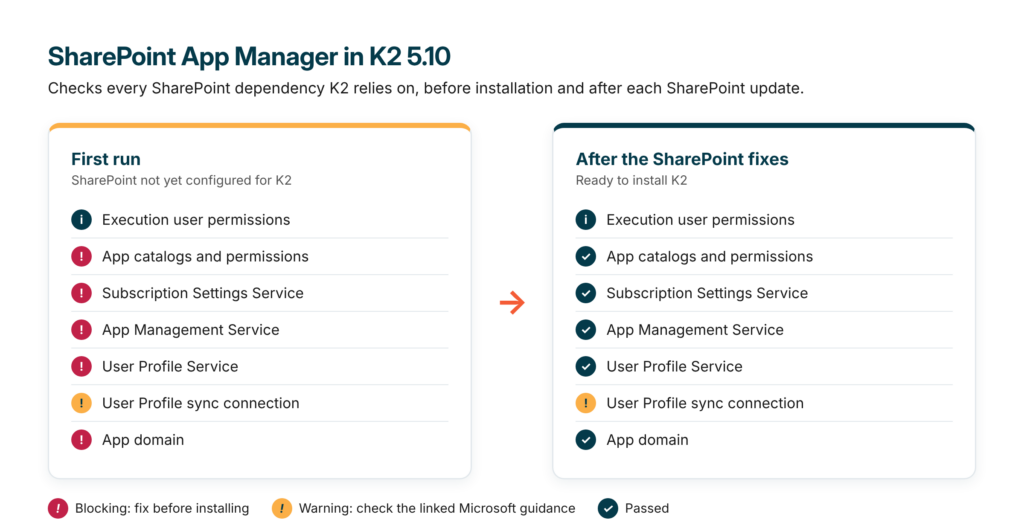
Illustration: the SharePoint App Manager on its first run (left) and after the SharePoint settings were fixed (right).
What this means for you: send the App Manager to your SharePoint administrator a couple of weeks before the installation window. The red items get fixed before your K2 team arrives, and you keep a health check to rerun after every SharePoint update.
Yes. The K2 Workflow Importer now accepts SharePoint Designer workflows from SharePoint 2010 and 2013, as .XOML or .XAML files, and converts them into K2 workflows through a wizard inside K2. It is the same conversion service that has handled Nintex for SharePoint workflows since K2 5.9, extended to a second source. For organisations migrating off SharePoint workflows, it is the most significant change in the release.
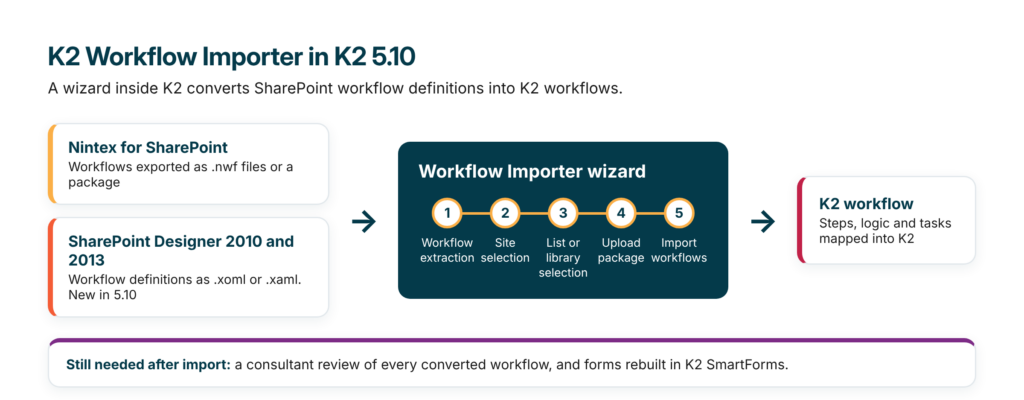
Illustration: the two sources the Workflow Importer accepts in K2 5.10, and the five steps of the wizard.
The timing matters. Microsoft’s SharePoint update of 13 July 2027 removes SharePoint 2010 workflows from SharePoint Server Subscription Edition, according to the KB5002945 release notes, and SharePoint Designer 2010 workflows run on that engine. SharePoint Designer 2013 workflows run on Workflow Manager and are not part of that removal, but SharePoint 2013 itself has been out of support since April 2023.
Even so, a converted workflow is still the original design, translated by a tool. Each one needs a review: look for logic that only made sense on SharePoint, and use the migration to simplify where possible. Forms are not part of the conversion either, so budget for rebuilding Nintex Forms and InfoPath forms in SmartForms.
What this means for you: if you still run SharePoint Designer or Nintex for SharePoint workflows on premises, you now have a supported route into K2 before July 2027. Start with an inventory, install the latest fix pack, and plan time to review each workflow and rebuild its forms.
SmartObjects get native JSON properties and query methods in this release, two capabilities K2 developers have previously had to work around.
SmartObjects were designed when XML was the default, and that is what they have used ever since. Integrating with a modern REST API usually meant a serialisation step, or a custom broker to flatten the response. In 5.10 a SmartObject property can hold JSON natively, and workflow and SmartForms expressions can read a value with a JSON path, with no serialisation step and no code.
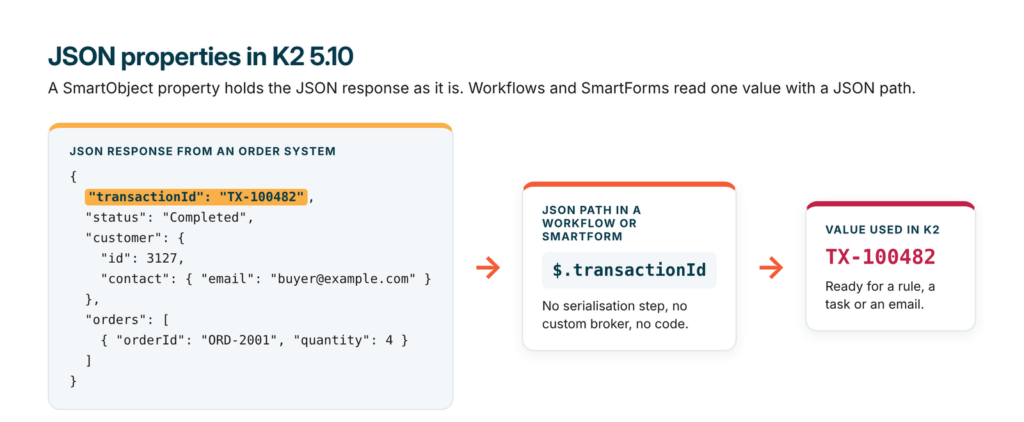
Illustration: reading one value from a JSON response with a JSON path.
You can now add a query method to a SmartObject, new or existing, for top 10 lists, counts, averages or grouping by date. You still write SQL, and the editor gives you a Validate Query button. What changes is where that SQL lives. It sits on the SmartObject as a method, so you can bind it straight to a chart control without a stored procedure on the database server.
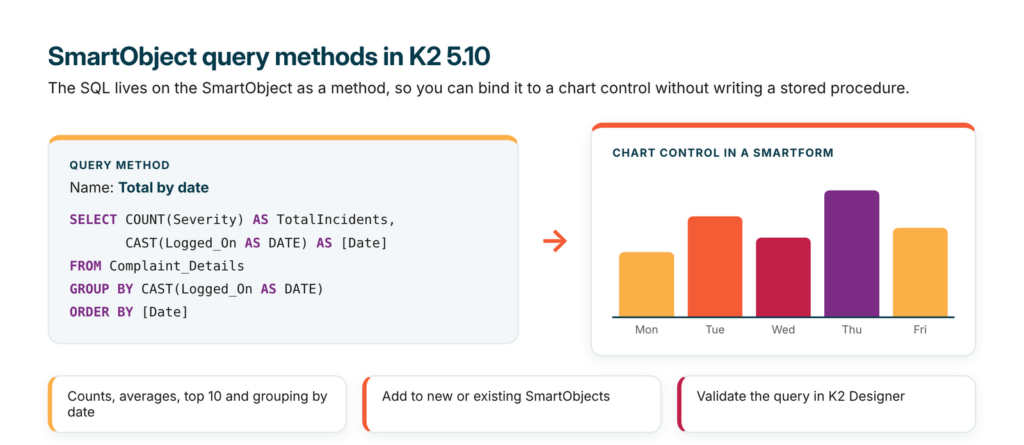
Illustration: the SQL sits on the SmartObject as a query method and feeds a chart control directly.
Both features came out of Nintex’s work on K2 Intelligence, the on premises AI engine that arrived in 5.9.1, and Nintex described them as groundwork for more AI features in K2.
What this means for you: you will maintain fewer stored procedures and custom brokers, build simple dashboards entirely in K2, and write less glue code between K2 and anything that returns JSON.
K2 Intelligence is Nintex’s on premises AI engine. It runs inside your own network, on the K2 server or a separate one, and makes no calls to an external AI service. It shipped in 5.9.1 and is included in 5.10, so customers who skipped 5.9.1 get it with this release. It comes with four built in AI tasks: severity, sentiment, language detection and text summary. The tasks are SmartObjects, so workflows, forms and views call them like any other data source.
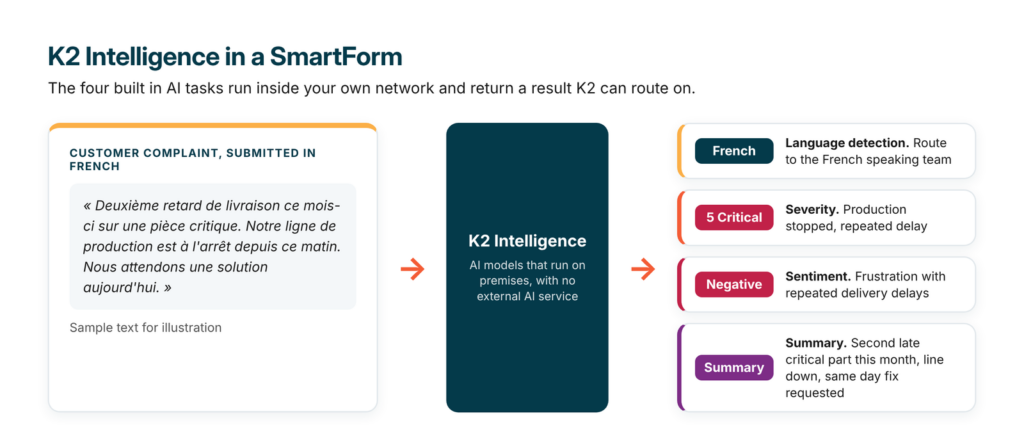
Illustration: the four built in K2 Intelligence tasks applied to one complaint.
Custom AI tasks. You can register your own task with a system prompt and settings such as temperature and maximum tokens, using the Create AI Task method in K2 Management. Once published, it appears as its own SmartObject. The steps are in Create and manage AI tasks, and Nintex’s best practices recommend turning on SanitizeUserMessage for any text that comes from users or external systems.
Your own models. K2 ships with Qwen3-0.6B, an open source model under the Apache 2.0 licence. You add others in the models.ini file, one section per GGUF model file with its own settings, then restart the K2 Intelligence service. Two settings matter for sizing: threads are set per model and add up, and a ctx-size that is unset or very high reserves its full RAM requirement when the model loads. Nintex documents every setting on the K2 Intelligence Service Windows service page.
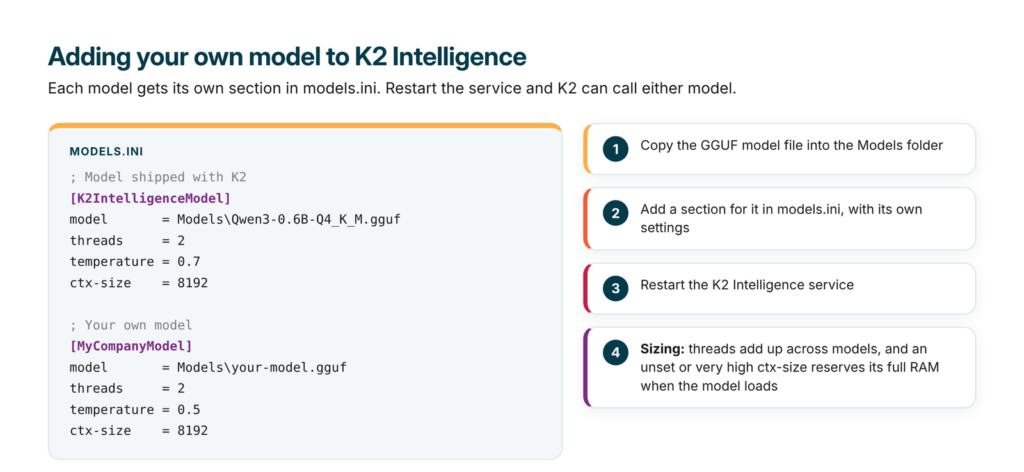
Illustration: adding your own model to K2 Intelligence in models.ini.
Codi Kaji, Director of Product Management for K2 at Nintex, explained the thinking during the release webinar: “AI is moving really fast, and so we don’t want to pin to a specific model.”
What this means for you: AI can go into K2 processes that handle sensitive data without that data leaving your network, and you can move to newer models without rebuilding the forms and workflows that call them.
The rest is maintenance, and most of it reduces upkeep and security risk. Nintex updated the Angular and GoJS frameworks under K2, moved the Oracle broker to Oracle’s current driver, added grouping of workflow steps and continued the accessibility fixes in SmartForms. Most of these changes came from requests logged on ideas.nintex.com.
Check your custom code. K2 5.10 removes every dependency on .NET Framework 3.5 and moves to .NET Framework 4.8, well before Microsoft ends support for 3.5 on 09/01/2029. Upgrading does not remove .NET 3.5 from your servers, and existing solutions keep working. The risk sits with custom brokers or controls built against 3.5. They will fail once it is removed, or on a fresh server that never had it, which is more likely now that Microsoft no longer includes .NET Framework 3.5 in Windows installers.
This is the change that needs action before the upgrade. Nintex’s advice is to remove .NET 3.5 from a development environment, test everything, and recompile anything that breaks against 4.8.
What this means for you: make a list of your custom brokers and controls now. If a partner built them, ask for the source code and a recompile plan before you upgrade.
Nintex plans to release K2 5.10 on Nintex Customer Central in late November 2026. It is the long term support release of this cycle, which in Nintex’s model means two years of standard support followed by two years of extended support. The release is cumulative, so it includes every 5.9.1 feature and fix pack, and you can upgrade to it without installing 5.9.1 first.
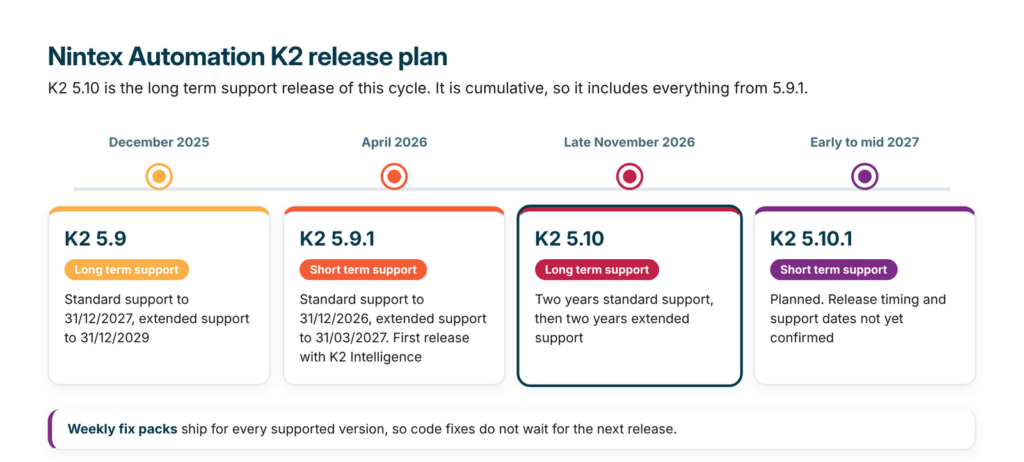
Illustration: the K2 release plan, with 5.10 as the long term support release.
K2 5.9.1 is a short term support release. Nintex released it on 29/04/2026, and its standard support ends on 31/12/2026, with extended support to 31/03/2027, according to Nintex’s product support and release strategy page. K2 5.9 stays in standard support until 31/12/2027, with extended support to 31/12/2029. K2 5.8 left standard support on 30/09/2026, so customers still on 5.8 are already on extended support only, until 30/09/2028. The next release, 5.10.1, is a short term support release planned for early to mid 2027, and fix packs keep shipping every week for supported versions. Nintex has not yet published the supported upgrade paths into 5.10, or added 5.10 to its support page.
What this means for you: if you are on 5.9.1, plan the move to 5.10 before standard support ends on 31/12/2026. If you are starting a SharePoint migration, 5.10 gives you up to four years of support on one version.
Nintex previewed three areas of work for 2027 and beyond, with no dates or commitments. The first is an Agent Task Step that lets a K2 workflow call an AI agent, with rules for when a person reviews the result. The second is a rebuilt K2 Management site. The third is a new K2 Solution Deployment tool to replace much of today’s package and deployment process.
The agent step builds on K2 Intelligence, so agents would run inside your own network. The new Management site keeps K2’s existing APIs and SmartObject layer, and adds what administrators have asked for, such as a view of installed fix packs and the Workflow Importer inside Management. Solution Deployment would link environments, deploy only what has changed and keep an audit trail of who deployed what and when. None of these features are part of 5.10.
K2 5.10 is a practical release. For teams moving off SharePoint workflows, it brings document sets, start event context, a dependency checker and an importer that now covers SharePoint Designer. For developers, JSON properties and query methods remove two long standing workarounds, and removing .NET 3.5 now avoids a rush closer to 2029. For a SharePoint migration to K2 starting now, 5.10 is the natural target version.
If you are planning a move from SharePoint workflows, or an upgrade to 5.10 from an older K2 version, AMO Consultancy, a leading global Nintex and K2 partner, can review your environment and plan the route with you.
Do I need to install K2 5.9.1 before upgrading to 5.10?
No. Nintex says 5.10 is cumulative and includes every 5.9.1 feature and fix pack. Nintex has not yet published the supported starting versions for the upgrade, so check them before you plan.
Does the new workflow context option work with SharePoint Online?
No. Nintex said the workflow context option is for supported versions of SharePoint on premises only.
Will our custom K2 brokers stop working after upgrading to 5.10?
Not straight away. K2 5.10 leaves .NET Framework 3.5 installed on your servers. Custom brokers or controls built against .NET 3.5 fail once .NET 3.5 is removed, or on a new server built without it, so recompile them against .NET 4.8.
Does the Workflow Importer convert forms as well as workflows?
No. The K2 Workflow Importer converts workflow definitions. Nintex Forms and InfoPath forms are rebuilt in K2 SmartForms.
Does K2 Intelligence send our data to a cloud AI service?
No. K2 Intelligence runs inside your own network, on the K2 server or a separate one, and the built in tasks make no calls to an external AI service. You can still connect K2 to an external AI model of your choice if you decide to.
Is the K2 agent step available in 5.10?
No. Nintex presented the Agent Task Step as future work, with no release date.
Questions about your own K2 environment? Contact AMO.