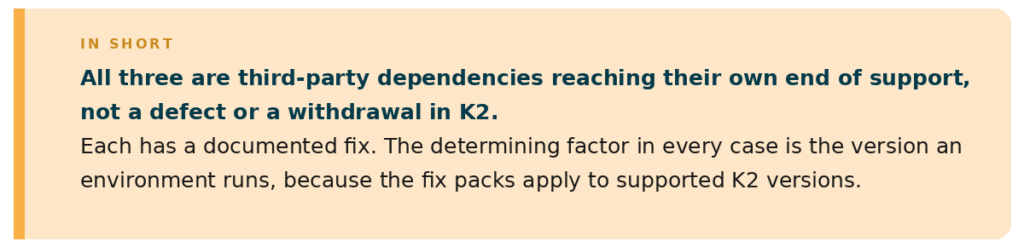
Three technologies that Nintex K2 relies on reach end of support in 2026. None of the three is a change to K2 itself. Each has a published remediation path, and the deadlines fall between October and November 2026
If you own or sponsor a K2 platform, you may have received a notice from Nintex about end-of-support technologies in 2026. Three pieces of technology that K2 relies on are being retired by their owners, Microsoft and Google, each on its own schedule. K2 calls on them; it is not itself being withdrawn. Nintex has published a remediation path for each, is releasing fix packs for supported K2 versions, and is contacting affected customers directly.
K2 runs the automated processes behind the scenes of a business: approvals, notifications, membership and invoicing steps, and more. Many of those steps send emails, and some render screens inside a web browser. The three changes below affect the older plumbing K2 uses to do this.
The practical risk is quiet rather than dramatic. If a K2 version is too old when a deadline passes, automated emails may simply stop arriving, or certain screens may stop displaying correctly. None of the fixes is especially complex, but each needs planning, because the oldest versions cannot be patched. They have to be upgraded.
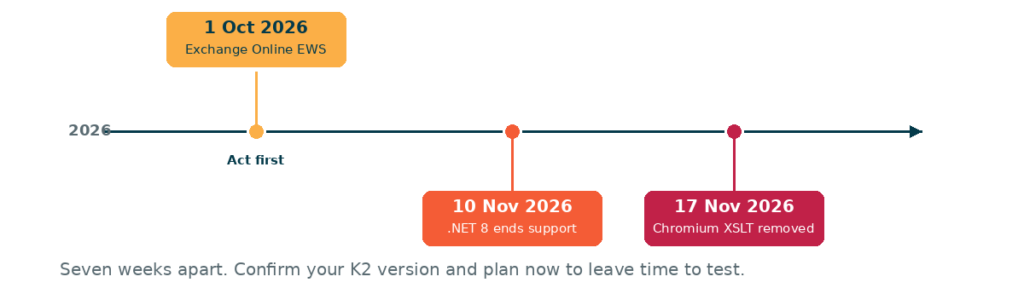
The deadlines fall within seven weeks of one another. Confirming the K2 version and scheduling the work now leaves time to test before each date.
Each row is colour-matched to the timeline above.
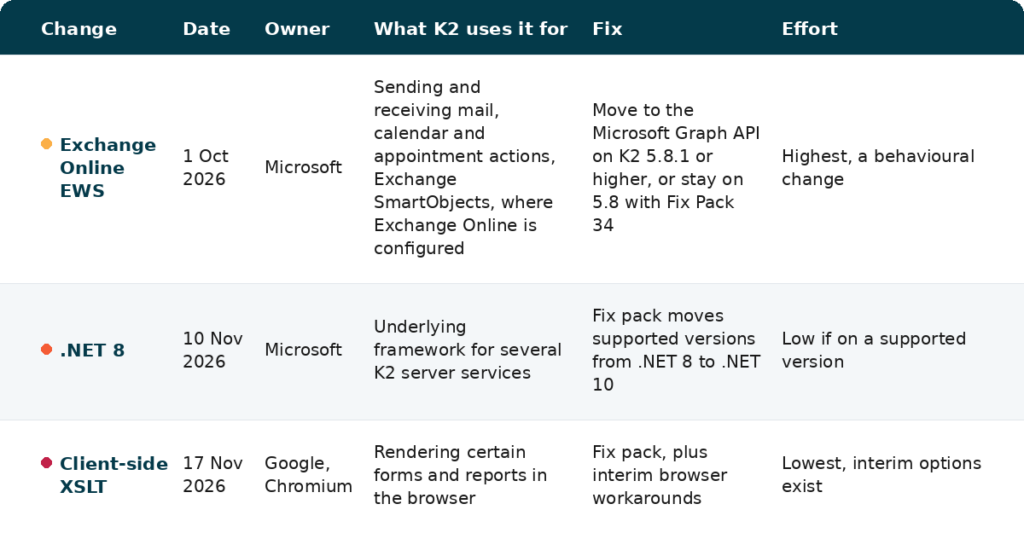
Only the Exchange change alters how workflows behave. The other two are resolved by installing a fix pack, provided the environment runs a version Nintex still supports. Establishing that version is the first task, because it determines whether each item is a fix pack or a scheduled upgrade.
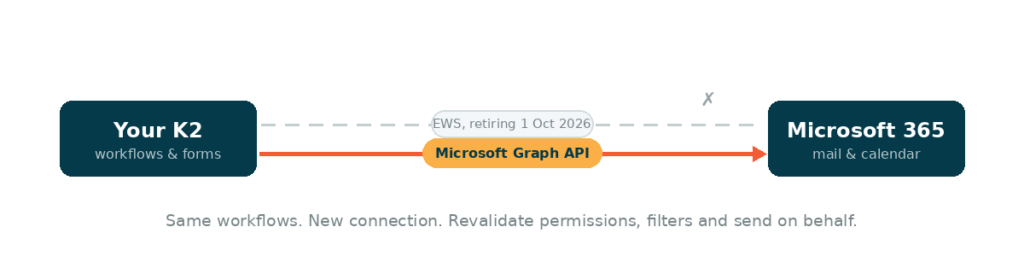
K2 workflows that send email, book calendar entries, or read mailboxes through Microsoft 365 currently do so through Exchange Web Services, a Microsoft channel dating back nearly two decades. Microsoft is retiring EWS for cloud mailboxes. Where a workflow still depends on it, email and calendar actions can stop working once it is disabled.
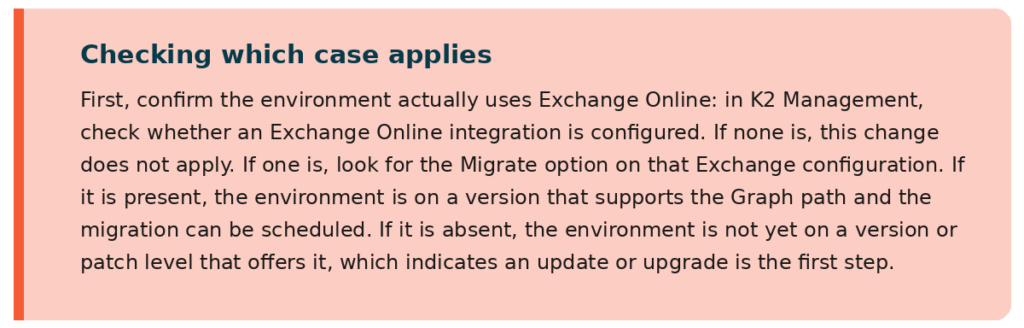
This only affects K2 environments that have Exchange Online configured. If your K2 has no Exchange Online integration set up, or your mail runs on Exchange Server on-premises, this date does not affect you. Microsoft is retiring EWS for Exchange Online, the Microsoft 365 cloud service, only. On-premises Exchange Server is out of scope entirely.
Microsoft is using a phased, admin-controllable disablement that begins on 1 October 2026 and completes with a full shutdown on 1 April 2027. The replacement is the Microsoft Graph API, which K2 has supported since version 5.8.1. Here is Nintex step-by-step migration guide.
The move from EWS to Graph is a behavioural change, not only a configuration switch. Graph applies stricter permissions and handles some mail properties, filtering, and send-on-behalf behaviour differently. Affected workflows, SmartObjects, and forms should be revalidated and, in a small number of cases, adjusted rather than simply repointed. The sequence is: confirm the version, run the guided migration, then regression-test every Exchange-related action ahead of October.
The workflow logic itself does not change. The email connection changes, from EWS to Graph, and the new connection applies different rules on permissions and behaviour.
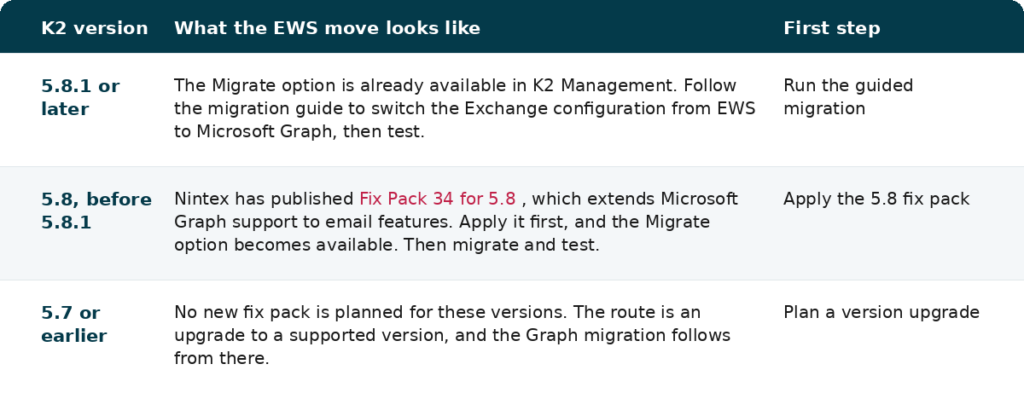
Everyone on Exchange Online is in scope. The path depends on the K2 version.

.NET is a Microsoft framework that several parts of K2 sits on. K2 uses .NET Core across several server services, including the configuration service, the OAuth and Claims services, and the JavaScript Service Provider. Microsoft ends support for .NET 8 on 10 November 2026.
Nintex is releasing fix packs for supported K2 versions that move the framework from .NET 8 to .NET 10, and will publish the exact fix pack levels as they are released. Only recent releases carry .NET 8 support in the first place, so an environment on an older, unsupported version faces a planned upgrade rather than a fix pack. The Nintex product compatibility matrix lists supported upgrade paths.
Chrome and Edge are removing client-side XSLT, a browser feature K2 uses to render certain forms and reports, in both design-time and runtime. From 17 November 2026 the affected screens may not render correctly in an updated browser.
Nintex is releasing fix packs for supported versions 5.7, 5.8, 5.9, 5.9.1 and later. Where the fix pack cannot be installed before the date, three interim browser options keep the affected forms working. A supported workaround is documented by Nintex.
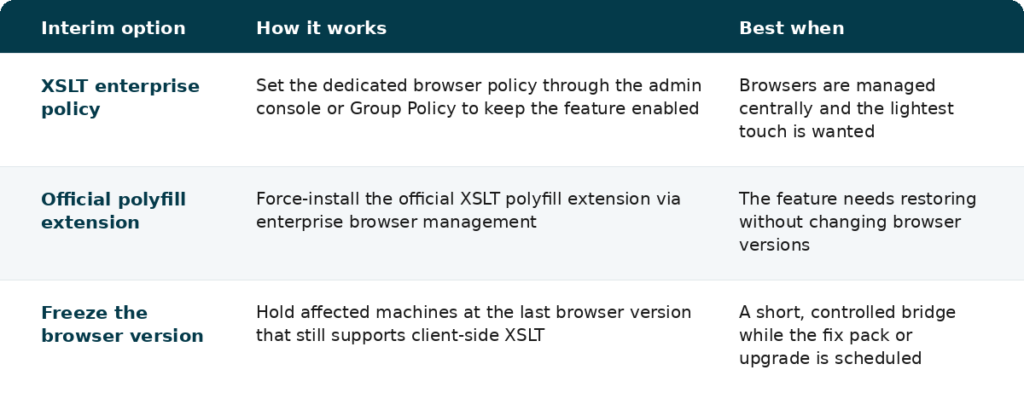
Each keeps the affected forms working while the fix pack or version upgrade is scheduled. None is a permanent fix.
Version 5.7 and earlier will not receive new fix packs, so the only supported route is an upgrade to 5.8.1 or higher. That can be a larger project than a patch, particularly where workflows still live in K2 Studio and have not yet moved to K2 Designer. If that describes your environment, it is worth starting the conversation early rather than close to the deadlines.
K2 Cloud customers have less to organise directly. For cloud environments, Nintex releases the fix packs and schedules a maintenance window to apply the required changes, so the task there is awareness and sign-off rather than hands-on work.
None of these dates is a problem in isolation. They are end-of-support milestones for technologies K2 uses, each with a published remediation path. The Exchange date is the earliest and the most involved, so it sets the pace. Confirm the K2 version, size each item against it, and schedule the work with room to test.
As a Nintex Premier Partner, AMO helps K2 customers plan and carry out these upgrades with no disruption to live environments. We confirm the version, size each of the three items for the platform, and schedule the work against the autumn deadlines. If you need support or advice, get in touch with our team.
The dates and remediation paths above are drawn from the following Nintex and Microsoft pages.