Nintex Automation K2 5.9.1 is now available through the Customer and Partner portals. Coming just a few months after 5.9, this is a smaller but strategically important release. It focuses on two areas that matter to every IT decision maker today: putting AI to work inside your existing environment, and modernising how K2 handles identity management.
If 5.9 was about giving you more flexibility in your forms and integrations, 5.9.1 is about giving you more intelligence and more control over who accesses your platform, without adding complexity to your estate.
The headline feature in 5.9.1 is the new K2 Intelligence Engine. It is a locally hosted AI model that runs inside your own network, behind your firewall, with no dependency on an external cloud provider.
Four AI actions are available out of the box:
1. Language detection
2. Text translation
3. Sentiment analysis
4. Text summarisation
These actions plug directly into your workflows and SmartForms through the SmartObjects framework you already use.
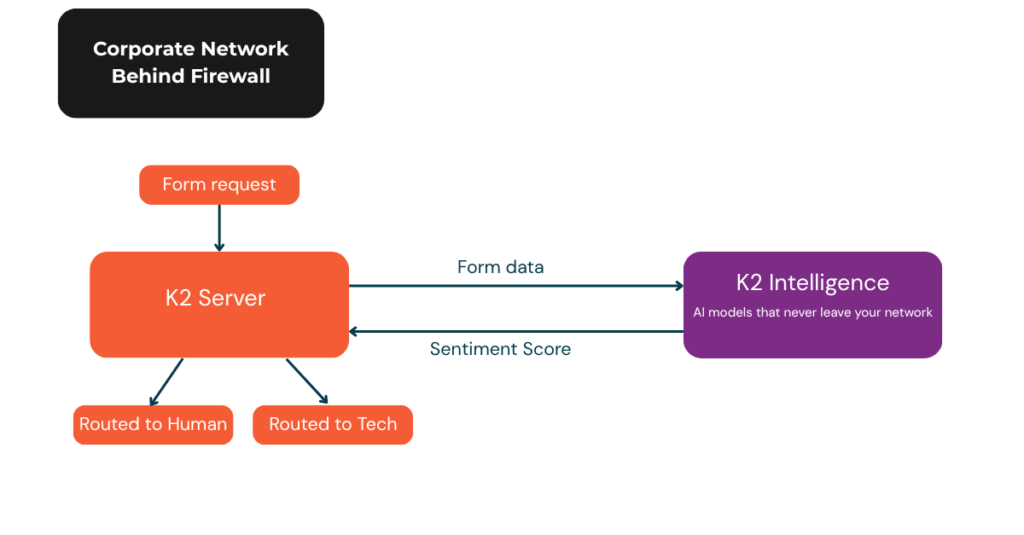
You can start using AI in your business processes without renegotiating data residency policies, without signing new vendor contracts, and without unexpected consumption-based costs. A customer complaint form can be scored for sentiment and automatically routed to the right team. A multilingual request can be translated on the fly before it reaches a reviewer. A long document submitted through a workflow can be summarised for the approver before they even open it.
For regulated industries such as banking, healthcare, insurance or government, this is a meaningful step. AI becomes usable within the same security perimeter as the rest of your automation platform.
The engine is also API first, which means your teams can extend it to call other models if you want to combine the built in capabilities with your own fine tuned models or with commercial services when appropriate.
The second major area of 5.9.1 is identity governance. Until now, integrating K2 with modern identity providers often meant custom configuration and manual SQL work. 5.9.1 changes that.
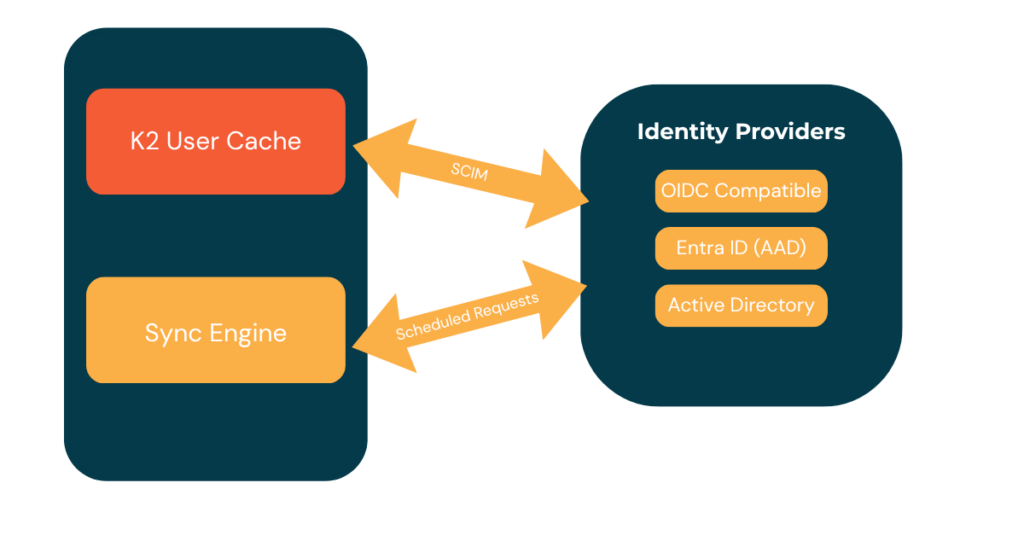
K2 now offers out of the box support for OIDC compatible identity providers, with Keycloak and Okta as first class options. Configuration is reduced to three fields: base URL, client ID and client secret. No custom code, no workarounds.
What this means for you: If your organisation has moved away from Microsoft only identity stacks, you can now connect K2 to your chosen provider in minutes instead of days. This is particularly useful for multi cloud or hybrid environments where Entra ID is not the single source of truth.
The new SCIM 2.0 support allows your identity provider to push users directly into K2 using the industry standard protocol. You can be selective about which users are brought in, which is valuable when you only want a subset of a large directory inside your automation platform.
What this means for you: Onboarding and offboarding become fully automated. When a user leaves your organisation, their access to K2 is revoked without manual intervention. When a new team is formed, they can be provisioned into K2 as part of the same process that creates their identities in Okta, Keycloak or another OIDC provider.
The Sync Engine is now managed directly through the K2 Management site. No external installer is needed. You can schedule full or partial identity imports, monitor sync status in real time and review historical sync activity.
What this means for you: Administrators gain visibility and control over identity resolution without scripting. The right people get access to the right workflows, faster.
5.9.1 continues the accessibility work started in 5.9, with additional WCAG runtime fixes for SmartForms. Screen reader support is refined further, zoom behaviour at 400 percent is corrected and contrast ratios for disabled states are improved. A new high contrast style profile is available in the Nintex Gallery, so teams can start from a compliant example rather than building accessibility from scratch.
The Workflow Designer now gives you control over autosave. You can change the interval or turn it off entirely, which is useful for teams that prefer to manage versions manually or that are working on shared projects where uncontrolled autosave can create conflicts.
What this means for you: Accessibility compliance becomes easier to evidence during audits, and developers working on complex workflows get finer control over how and when their changes are persisted.
Nintex has also given a preview of what is coming next for K2. The Smarter SmartObjects initiative will bring a native query language into the K2 Designer, so common tasks like top N, counts and aggregates can be done without writing stored procedures. JSON property support is being added, moving away from the older XML based model and unlocking cleaner integration with modern APIs and future AI use cases.
This is not part of 5.9.1, but it shows where the platform is heading: less boilerplate, more direct data shaping inside the designer, and better foundations for AI driven workflows.
K2 now follows a twice yearly feature release cadence on premises. 5.9.1 is a short term support release with one year of standard support. The next long term support release, K2 5.10, is planned for late 2026 with the usual two plus two years support window. Weekly fix packs continue to be delivered on all supported versions.
What this means for you: If you want the newest features quickly, 5.9.1 is a good target. If you prefer to plan longer upgrade cycles, you can wait for 5.10 and still benefit from weekly patches on your current release.
K2 5.9.1 is a focused release that addresses two of the most frequent questions we hear from our clients: how do we bring AI into our automation platform without compromising security or data sovereignty, and how do we modernise identity management without custom code?
The answers in this release are practical. A locally hosted AI engine with ready to use actions. Native OIDC and SCIM support with built in Sync Engine management. Continued progress on accessibility and designer ergonomics. And a clear roadmap for Smarter SmartObjects later in the year.
If you are planning an upgrade, evaluating how to introduce AI into your workflows, or reviewing your identity strategy, our team at AMO Consultancy would be delighted to help you navigate the options and design an approach aligned with your roadmap.
For the full release notes, see the Nintex help site.
If you need any information about the Nintex K2 platform, our team will be more than happy to help. Get in touch!